![Quartet logo (light)-1.png]](https://knowledgebase.ensembleip.com/hs-fs/hubfs/Quartet%20logo%20(light)-1.png?height=33&name=Quartet%20logo%20(light)-1.png)
Anywhere in Quartet where classifications are displayed, hovering over the classifications will bring up a classification popup window. The popup window shows the classification schedule with the subclass, main group, and all of the indented subgroups. Included in the popup are classification definitions and whether there are any additional children classification codes.
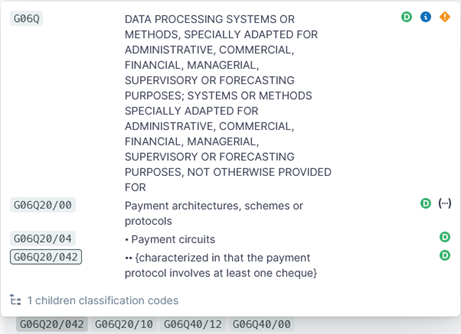
Classifications in Quarter are highlighted in a gray highlight.
In the popup, the user can select and copy out any text. Clicking on any classification inside the popup will open the classification schedule at its respective page in a new tab.
To the right of the definitions are additional information about each classification that can be gleamed from the classification schedule page as represented by an icon.
 signifies definition,
 signifies notes,
 signifies a warning, and
 signifies that parenthetical information of a classification’s definition has been removed.
Parenthetical information is meant to redirect a user to other classifications and not shown in Quartet, but can be seen in full at each respective classification schedule page.- “Children” tells users that there are multiple indented classes. If a particular classification code is relevant, this gives the user a clue to explore other closely related children codes.