![Quartet logo (light)-1.png]](https://knowledgebase.ensembleip.com/hs-fs/hubfs/Quartet%20logo%20(light)-1.png?height=33&name=Quartet%20logo%20(light)-1.png)
Focus and rerun will tweak AI results with references found while searching, or with already known references. These references supplement the original AI search with the additional information from the focus documents. The original AI Search will still be there, but there will be a new, additional search in the timeline, combining the disclosure of the original search with the new information from the provided focus.
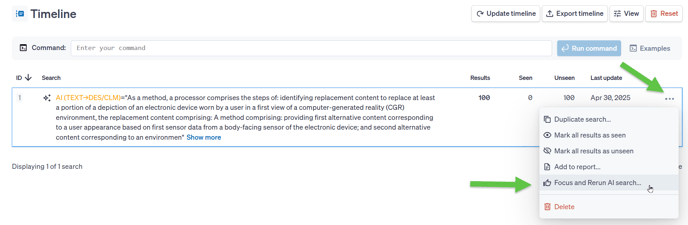
Focus and Rerun is currently available for AI searches and can be accessed multiple ways. The first option is from the timeline itself, click on the 3 dots for an AI search string to access the option to Focus and Rerun the AI search.
Second is within the AI search results. While reviewing the list of returned documents, a thumbs up button is be available in the top right corner of every record, next to the save button.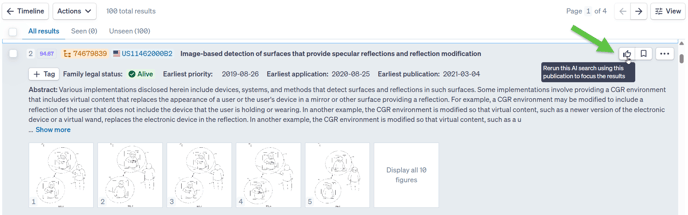
The final access point for focus and rerun is within the representative or individual view. Similar to the results list view, a thumbs up can be found on the top right corner next to the save button.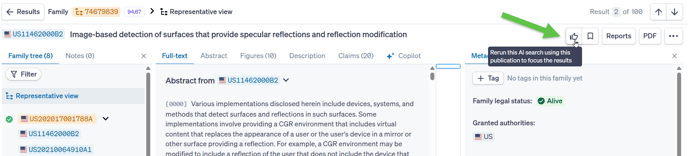
All options will create a pop up allowing a publication number to be specified as the focus of this rerun AI search.
The number input in this case will run as a number search, whereby it will check the publication number and allow for an opportunity to check the publication number for correctness.
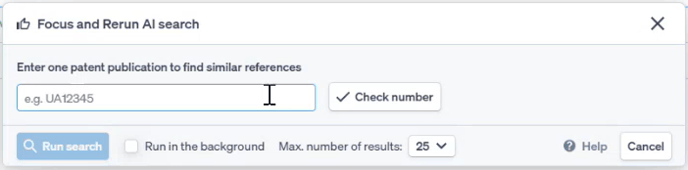
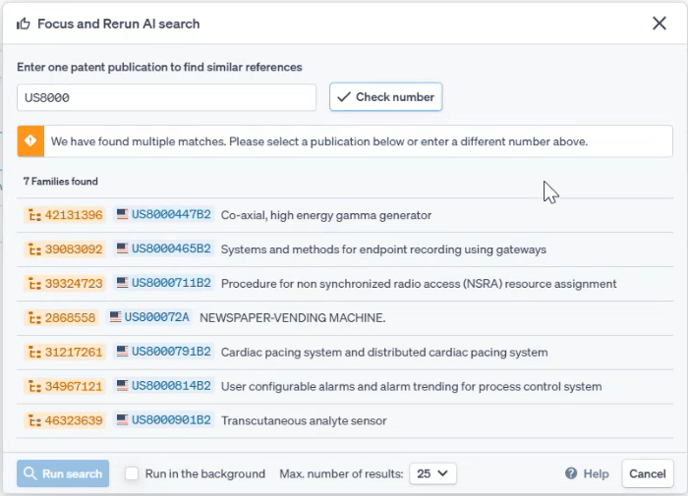
The latter two options will have the publication number pre-selected, as the modal was accessed through a specific publication.
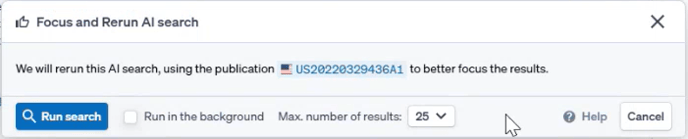
Within this modal there are also options to select the number of results of the rerun string, as well as how the string will run. Maximum number of results is simply the number of results the rerun string will return.
“Run in the background” check box matters more for accessing the focus and rerun feature while viewing results and less when accessed from the timeline. This option will keep the screen at the results list or the individual view as the search runs in the background. Not checking the box will return the screen to the timeline as the new AI search runs.
Important to note, that if you run in the background, the current result list is NOT refocused, the new, focused string but be entered from the timeline.
Once the Focused AI search is run, it will appear on the timeline as the search string

Focus and rerun can be run multiple times, by accessing the menus with the methods listed above, but from within a Focus and rerun string, additional search strings appear as so

It is important to note, an AI string can only be refocused three times. Through testing it's been found that having more than three tuned references degrades the results. After three refocuses have been run, the thumbs up button within that third search string, as well as the option from the timeline, will be greyed out and cannot be selected.
A refocus can be run from any of the previous strings if one of the focuses should be dropped. The focus must be added to the AI string one at a time, with the methods listed above.
It is recommended that care is chosen for the focus documents, they should be complementary references to avoid pulling the AI into different directions. Multiple documents with large differences should not be focused together if it can be avoided. AI strings, including the initial string with the disclosure, or original focus, are not runnable from the command line, this extends to the focus and re-run strings.
To help keep track of which focus string, and where in Quartet the current view is from, the breadcrumbs from the current search are shown at the top of the page.

For more information about running AI searches, please visit this article.