-1.png?height=120&name=Quartet%20logo%20(light)-1.png)
Search queries can be deleted from the Timeline and the Timeline will update accordingly.
To delete a search query from Timeline:
- Hover over the search string the user wishes to delete
- Click the three-dot button on the far right side
- Select Delete
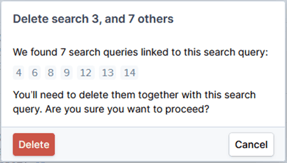
When a query is deleted, the action cannot be undone and the system will display a warning asking the user to confirm the action.
When a query is deleted, subsequent queries which depend on the deleted query via a line reference will also be deleted. The system will automatically update and renumber any affected subsequent queries and any relevant query references.
Alternatively, the user can choose to delete all search queries in the Timeline using the "Reset" button. The “Reset” button will delete all search strings in the project and provide the user with a clean Timeline. The system will ask the user to confirm reset, as the deleted search queries cannot be recovered once deleted.