-1.png?height=120&name=Quartet%20logo%20(light)-1.png)
Quartet tracks the documents a user has reviewed within a project and marks them as “seen” for that specific project.
The Seen/unseen functionality allows users to quickly identify references that they have already reviewed. Any family that is viewed for longer than three seconds in Detail view will be marked as “seen” for all previous and future queries within the same project.
Seen/Unseen on Timeline
On the Timeline, “seen” and “unseen” numbers for all search queries will update as previously unseen references are reviewed regardless of the query in which the result was reviewed.
“Seen” and “unseen” data is saved to each individual project, so deleting a specific search query will not remove those references from being marked as seen. Resetting the entire Timeline, however, will reset seen/unseen tracking.
Because “seen” and “unseen” data is per project, if a user reviews a reference in Project A, and then moves to Project B and the same reference is returned as a result, it will still be marked as “unseen” in Project B as it has not been reviewed in Project B.
Seen/Unseen in Results View
Seen/unseen functionality can also be found in Results view. Within Results view, there are three tabs sorting the references into “All results,” “Seen,” and “Unseen”. Selecting one of these tabs will change the user’s view so that only the associated results are shown.
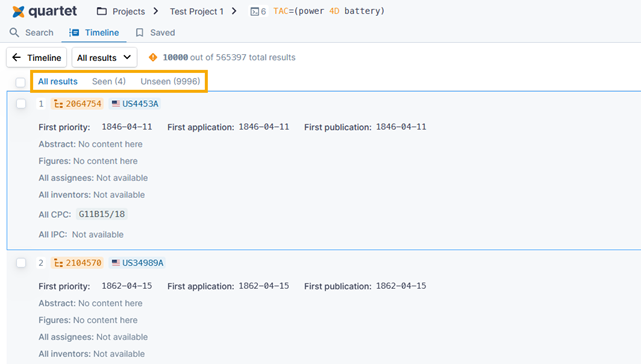
The number of Seen/unseen results will update as the user views references for long enough to be flagged as viewed, however, the tab itself will not update unless the user leaves Results view for that search string and returns. This is to prevent confusion with references moving around while the user is trying to review results.
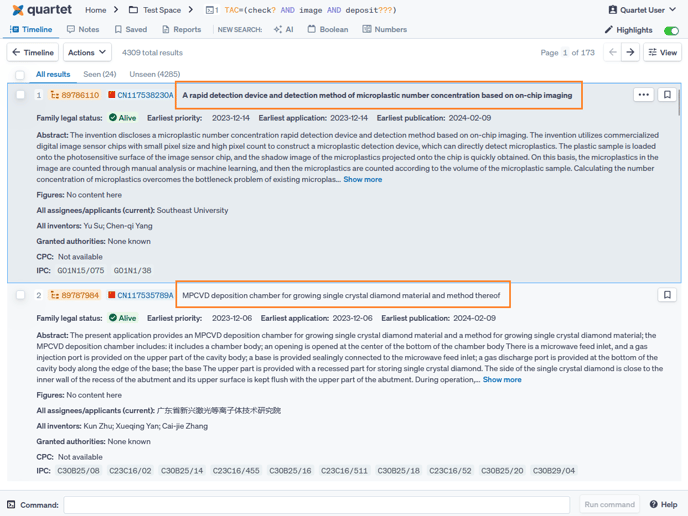
Additionally, references that are "unseen" will have a bolded title in Results view, while "seen" references will have an unbolded title.
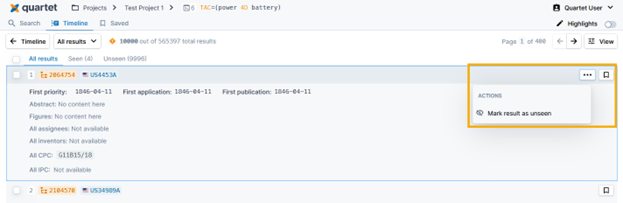
Reference seen/unseen status may be changed both individually as well as en masse. To do so: hover over a reference within Results view > select the three-dot “actions” button for each reference > toggle the individual reference from seen/unseen.
The “All results” button allows the user to mark either all results or a selected subset of results as seen/unseen.